After the last article about pushing local dictation latency down to roughly 300 milliseconds, I kept coming back to a more uncomfortable question.
If a Mac can run Whisper locally, host coding agents, route tasks to multiple models, and control a browser or terminal, when does it stop being “a computer with AI tools installed” and start becoming a personal AI workstation?
My first answer was too generic: inputs, models, routing, memory, actions, observability. All true. Also too easy to write from the internet.
The better answer came from the systems already running on my own machine. A useful local AI workstation is not defined by the largest model it can load. It is defined by whether many small AI capabilities can reliably survive contact with daily work: macOS permissions, launchd, broken PATHs, OAuth drift, WebSocket resets, background jobs, stale browser sessions, artifact validation, approval gates, and the quiet terror of an agent saying “done” when no file was actually written.
So this article is not a model-buying guide. It is a field report from the local stack I have been building around voice-input, Seven, Eleven, Content OS, and Sentinel.
That is the thesis: a personal AI workstation is a Mac that can turn intent into action through a reliable local toolchain. The model is only one component inside that chain.
Most conversations about local AI start with model runners and RAM. Those questions matter, but they are not the center of the system.
A workstation has to answer operational questions: how intent enters without breaking flow, which capability handles the task, what can write files or publish drafts, how completion is verified, and what happens when a long-running job hits a captcha, stale cookie, dead OAuth token, or half-written output.
That is the difference between a local chat window and a local AI workstation.
A chat window answers. A workstation acts.
But acting safely requires engineering.
Case 1: voice-input and the 300 ms Threshold
The most visible part of my setup is still the smallest one: voice-input, a macOS menu-bar tool I built half a year ago.
The interaction is intentionally boring. Hold Option, speak a sentence or two, release, and the recognized text appears in the current input field. If the tool is slow, I wait. If I wait, I grab sunflower seeds. If the latency gets bad enough, a technical problem becomes a snack consumption problem.
The old implementation was straightforward: record audio, spawn a Whisper CLI process, load the model, transcribe, paste the result, exit. It was easy to reason about and very hard to enjoy. large-v3 took roughly 7 to 12 seconds per short utterance because every request paid the same cold-start tax: Python startup, imports, backend initialization, loading several gigabytes of weights, decoding audio, inference, teardown.
The new implementation moved the model lifecycle out of the hot path. A local whisper-daemon listens on 127.0.0.1:18092, keeps MLX Whisper models resident in unified memory, and serves both the menu-bar app and Seven’s Chinese voice-message handler. The core is not grand: roughly 400 lines of Python, a launchd plist, a standard-library HTTP server, and a single inference worker queue because there is still only one Metal GPU path to protect.
The important change is architectural:
voice-input.app ─┐
                 ├─ HTTP 127.0.0.1:18092 ─ whisper-daemon ─ mlx-whisper
Seven voice msg ─┘
In my local short-utterance tests on the same M-series Mac, once small and large-v3 are warm, the daemon request path for short Chinese dictation landed between 295 and 343 ms for large-v3. small landed closer to the 87 to 134 ms range. Audio capture happens before this measurement, and the final paste step adds only a small UI overhead. At that point the tool no longer feels like “sending a job to an AI model.” It starts to feel like an input method.
That threshold matters. AI tools become habits only when the entry cost is lower than the cost of doing the task manually.
The work, though, was not only about speed. The actual engineering problems were more mundane:
mlx-whispershells out toffmpeg, so the daemon’slaunchdenvironment had to include the Homebrew path.mlx-whisper’s defaultModelHolderbehavior was convenient for one model but awkward when alternating betweensmallandlarge-v3, so the daemon uses its own model registry and narrowly monkey-patchesModelHolder.get_model.- The Swift app needs stable Accessibility permission; ad-hoc signing without a fixed identifier can make every rebuild look like a new app to macOS.
- The client still falls back to the old CLI path if the daemon is unavailable, because a high-frequency input tool must degrade rather than drop text.
- Downloading the
whisper-large-v3-mlxsnapshot ran into Clash fake-IP and long TLS stream failures, which is not an ASR issue at all, but still part of shipping the tool in China-network reality.
The lesson was not “MLX is fast,” even though it is. The lesson was that local AI becomes useful when the model is turned into a resident, observable, boring service.
If your “local AI workstation” still loads the model from scratch every time you press the shortcut, it is not a workstation yet. It is a demo with good intentions.
Case 2: Wrappers Are the Workstation’s System Calls
Once I started letting agents call other agents, the next failure mode appeared quickly: raw CLIs are too sharp.
Seven and Eleven are two separate local assistant gateways I use for different automation surfaces. Both can ask Codex, Claude Code, Kimi, Qwen, or a cloud Qwen model to do different kinds of work.
The naive approach is obvious:
codex exec "fix this"
claude -p "review this"
kimi "rewrite this"
That approach broke in ways that are boring to describe and painful to debug.
The Codex wrapper is the clearest example. An early codex exec path inherited OPENAI_API_KEY from the surrounding bot environment. My Codex config preferred ChatGPT OAuth, but the CLI saw an API key in scope, printed the “ChatGPT login is required, but an API key is currently being used” class of error, and could delete the local auth file. The fix was not a better prompt. The fix was a wrapper that strips the environment, pins HOME and CODEX_HOME, performs login preflight, restores auth backups when needed, sets the workspace explicitly, and captures transcripts.
The current wrappers encode those lessons. seven-codex goes through codex-exec-guarded, with auth guarding and home-scoped workspace support for cross-tree tooling work. seven-claude captures Claude’s real exit code and handles SIGPIPE correctly so a downstream buffer closing does not look like a failed model run. seven-kimi pins PATH, supports --prompt-file, logs prompt metadata safely, and surfaces auth failures as explicit exit codes. The same pattern applies to local Qwen, cloud Qwen, and Sentinel: each capability gets a wrapper that defines where it runs, what it can see, how it logs, and how it fails.
This sounds like plumbing because it is plumbing. But it is also the difference between “my assistant can call tools” and “my assistant can call tools without slowly corrupting its own runtime.”
In a real workstation, model calls are not just prompts. They are system calls. System calls need stable arguments, permissions, working directories, logs, and exit semantics.
Case 3: Content OS Turns Prompts into Atoms
The next layer is where the system starts to look less like a chat setup and more like an operating environment.
My content workflow used to be a set of long prompts. Research prompt, outline prompt, drafting prompt, review prompt, publish prompt. It worked until it did not. Context became too large, failures were hard to reproduce, and every revision felt like reloading the whole mental state into a new model.
The Content OS version, which lives under my OpenClaw workspace, decomposes the workflow into atom skills: idea-capture, worker-pick, worker-run, draft-assemble, quality-score, kimi-review, visual-assets-build, publish-web-preview, and publish-wechat-oa.
The detail that matters is not the names. It is the contract.
Take worker-run. It is the atom that calls another worker CLI and records the raw result. Its input schema is not “please ask Kimi to review this.” It is a typed object:
{
  "worker": "kimi",
  "prompt_text": "Review this draft for originality and unsupported claims.",
  "timeout_sec": 600,
  "extra_flags": []
}
Its output is also typed:
{
  "stdout": "...the worker's raw final answer...",
  "stderr": "",
  "exit_code": 0,
  "wall_time_sec": 19.9,
  "command_run": "seven-kimi --prompt-file ..."
}
That shape is the point. The prompt is passed as data, the timeout is bounded, the exit code is part of the result, and the calling pipeline can decide what to do next without reading a chat transcript like tea leaves.
Many Content OS atoms follow the same pattern: read JSON from stdin, validate against a schema, perform one bounded operation, write trace information, and return JSON on stdout. The article pipeline manifest then encodes step order, revision loops, and decision points instead of leaving them as vibes inside a paragraph of prompt text.
For example, the publishing pipeline manifest has:
- a kill-switch check at the beginning;
- a default cost budget;
- a sequential section-drafting rule;
- a quality-score loop that can re-run weak sections;
- a mandatory Kimi review loop;
- a visual-assets stage after review so images do not go stale against pre-revision text;
- an inline-visual injection step so generated images actually appear in the article body;
- a website preview step;
- a wait-for-preview-ready step;
- a publish confirmation decision point before platform sync.
That is the difference between “the AI helped me write” and “I can run a content production system without losing the thread.”
The important principle is this:
A serious personal AI workstation should convert repeated prompt rituals into small, typed, auditable operations.
If an operation matters enough to repeat, it should eventually become an atom.
Case 4: Trust Artifacts, Not Agent Prose
One of the most useful rules in my local stack is also the least romantic:
Trust artifacts, not agent prose.
Seven’s Codex orchestrator exists for long-running or failure-prone jobs where Codex CLI should do the implementation but Seven should remain in control of the loop. The orchestrator launches the task, then checks the result from disk: file existence, modification times, size, required text content, exit codes, and logs.
If Codex says “done” but the expected artifact is missing, the job is not done.
If the file exists but the mtime predates the attempt, the job is not done.
If the process exits successfully but the health check fails, the job is not done.
The repair loop then builds a new prompt from the failure context: stderr tail, stdout tail, missing file path, health-check reason, and the previous attempt’s state. Codex gets sent back into the problem with better context, not with a vague “try again.”
That is a very different mental model from normal chat.
In chat, the assistant’s final message is often treated as the output. In a workstation, the final message is merely commentary. The real output is the file, the preview URL, the passing check, the created package, the updated database row, the state transition.
Once you accept that, orchestration becomes much simpler. You stop asking “does the agent sound confident?” and start asking “what changed on disk?”
This is also why local state matters. A personal AI workstation has access to the actual workspace, not just a copied snippet. It can inspect the file tree, run the command, see the generated artifact, and repair the pipeline that produced it.
Case 5: Sentinel and Long-Running Work
Short tasks are forgiving. Long tasks reveal whether the system is real.
Sentinel is a separate e-commerce competitive-analysis pipeline for Taobao and Tmall, but it uses the same atom-and-state discipline. It can analyze products, stores, search queries, and multi-product comparison scans. It fetches live data through browser-backed tooling, normalizes products and stores, records price observations, builds comparison matrices, validates visual reports, and can publish durable outputs to a review site, a vault note, or Telegram.
This kind of task should not run as a foreground “please wait” model call. A simple product scan can finish in minutes; a broader scan can stretch toward half an hour depending on product count, browser delays, captcha interruptions, and rate limits. Compliance gates may block a run. Data may be insufficient.
So Sentinel treats long-running work as state.
Seven launches it through seven-sentinel in background mode. Eleven uses eleven-sentinel for the same underlying pipeline. The orchestrator then polls durable state instead of waiting on a fragile process handle:
state/YYYY-MM/<RUN-ID>/blackboard.json
state/YYYY-MM/<RUN-ID>/brief.md
_runs-YYYY-MM.jsonl
The blackboard records the run id, source kind, path taken, metadata, outputs, and failure mode. A completed search run such as SRC-Q0005 records an outputs.competitive_brief.file_path, a character count, and section names like TL;DR, search demand ranking, blue-ocean candidates, signal credibility, and compliance warnings. A completed comparison run such as CMP-C0007 records a product matrix, shop composition, seller reputation, pain points, and compliance warnings.
Just as important, failures are named:
cookie_expiredcaptcha_presentrate_limitedblocked_by_complianceinsufficient_data
That list is a small thing, but it changes the whole operator experience.
If the problem is a captcha, I need to unblock Chrome. If the cookie expired, I need to log in. If the run is rate-limited, retrying immediately is harmful. If compliance blocked it, the pipeline is doing its job. If data is insufficient, the right output is a degraded brief, not a stack trace.
A workstation does not pretend long tasks are chats. It gives them state, logs, outputs, and failure categories.
The Stack I Actually Want
After these local projects, my definition of a personal AI workstation has become much more concrete.
It needs at least seven layers:
- Input layer: voice, hotkeys, clipboard, files, terminal, browser, chat channels.
- Resident capability layer: local daemons such as Whisper, Ollama, LM Studio, MLX services, or browser bridges.
- Delegation layer: wrappers that normalize how agents are called, where they run, and how they fail.
- Atom layer: bounded skills with typed inputs, typed outputs, cost estimates, and kill switches.
- State layer: files, SQLite traces, blackboards, logs, package directories, transcripts.
- Validation layer: artifact checks, health checks, review gates, preview URLs, human approval points.
- Recovery layer: fallback paths, explicit failure modes, repair prompts, retry limits, and escalation rules.
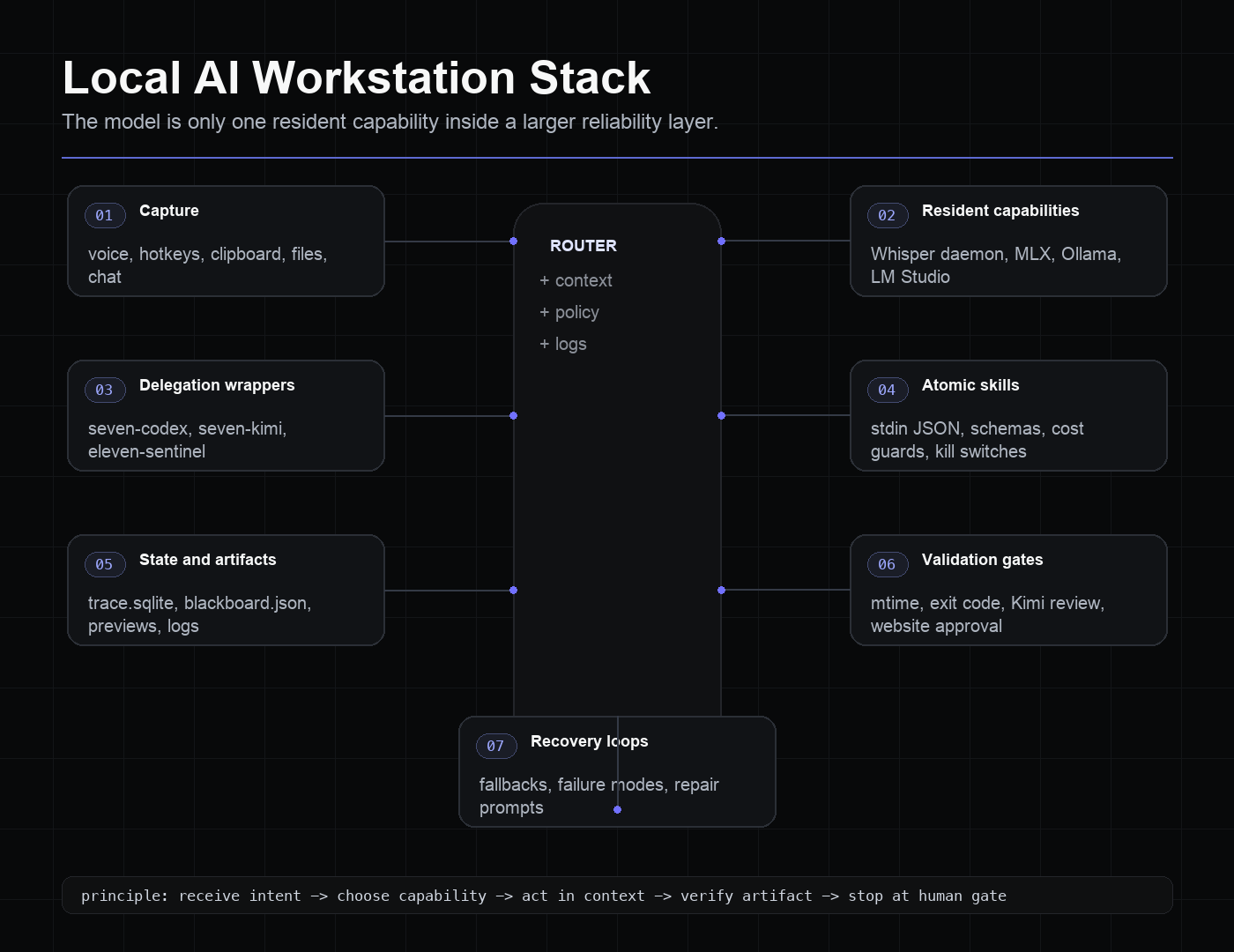
The point is to make AI work repeatable. This is the local AI workstation pattern: not one perfect model, but many imperfect capabilities wired together so daily work can survive their imperfections.
What I Would Build First
If I were starting from a clean Mac today, I would repeat the path that made voice-input useful: pick one low-friction input, make one local capability resident, wrap every delegated agent, write one trace file, validate one artifact, and put one approval gate before anything leaves the machine. That tiny loop is already more valuable than a folder full of model experiments.
Do not over-architect on day one. But do not mistake a local model for a local system.
The Real Definition
The more I build this stack, the less interested I am in saying “my Mac can run AI.”
That sentence is too small.
The better sentence is:
My Mac can receive intent, choose a capability, act inside the right workspace, verify the artifact, and stop at the right human gate.
That is what makes it a workstation.
This morning, the most meaningful part of that workstation was not dramatic. I held Option, spoke a sentence, and the text landed in my document before I had time to reach for the sunflower seeds. Underneath that tiny moment was a warm daemon, a stable wrapper, a traceable workflow, and a set of gates that keep local AI close to real work without letting it make a mess.